Turn monument artwork photos into plotter-ready stencils.
Upload a photo of the artwork — even a photo of a finished monument — and MonuOS isolates just the engraving and builds cut files your plotter can run: validated SVG and DXF at true inch scale, closed paths only, normal and inverted. No hand-tracing, no mailing artwork out to a service, no guessing whether the file will cut.
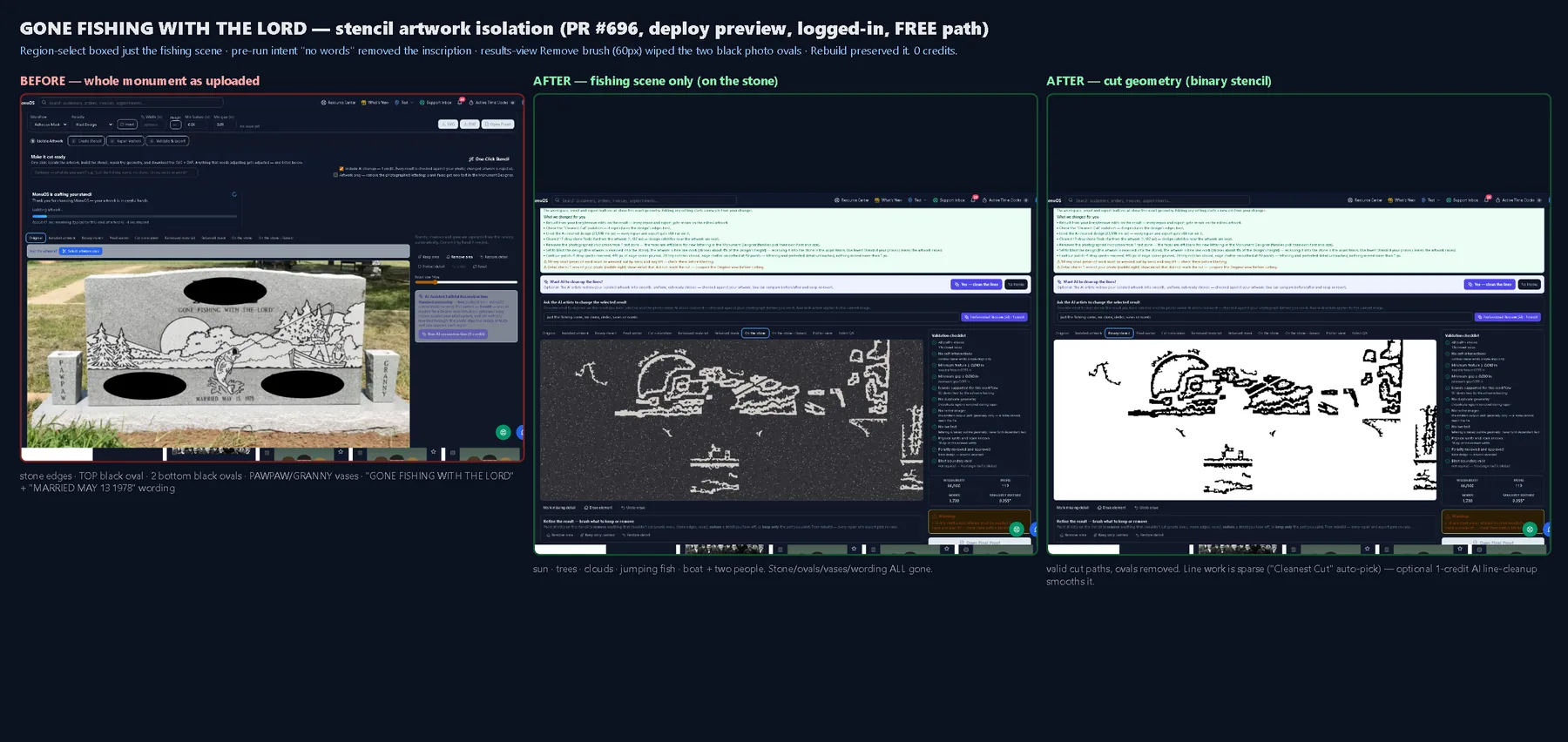
From a photograph to a cut-ready file.
The whole path runs in your browser, in four guided stages — and most of it is one click.
Isolate the artwork
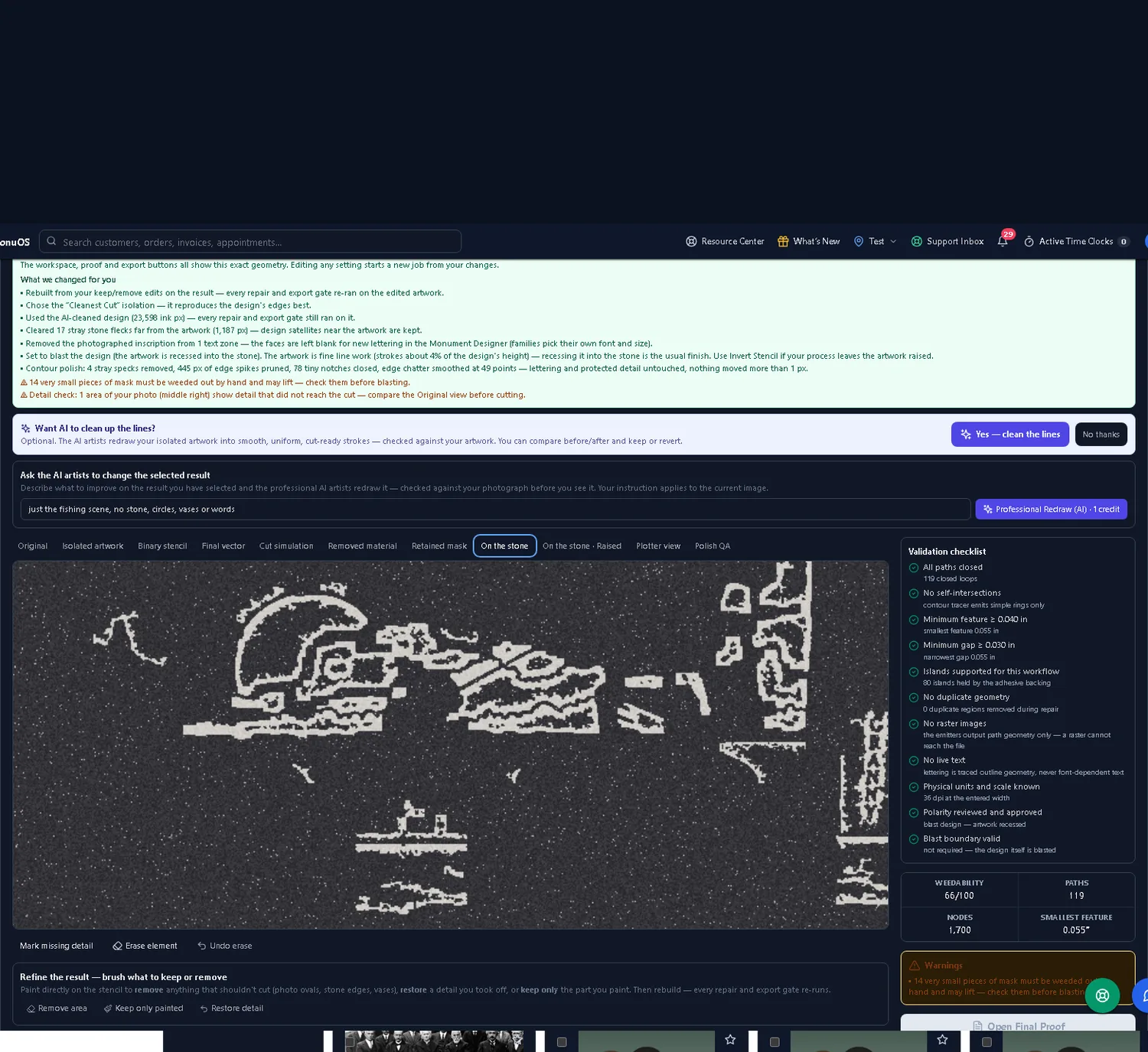
Box the area you want and tell MonuOS what to keep in plain words ("just the fishing scene, no stone, circles, vases or words"). It scopes the whole run to your selection and lifts the engraving off the granite, glare, and shadows.
Create the stencil & repair vectors
MonuOS builds the cut geometry and repairs it — prunes edge spikes, closes tiny notches, and smooths edge chatter — without moving protected detail more than a hair.
Validate & export
Every stencil runs a validation checklist. When it passes, download the SVG and DXF. When the two files don't agree, downloads stay locked until they do.
One-Click Stencil does isolate → build → repair → export in a single pass. The isolation runs on the free path — an optional AI line-cleanup polish uses one AI credit.
Keep the engraving. Drop the stone.
Photographed monuments come with everything you don't want: the granite edge, blank portrait ovals, side vases, and the old inscription. MonuOS removes them — up front with a region box and a plain-language intent, and afterward with keep/remove brushes and a rebuild that re-runs every gate on your edits.
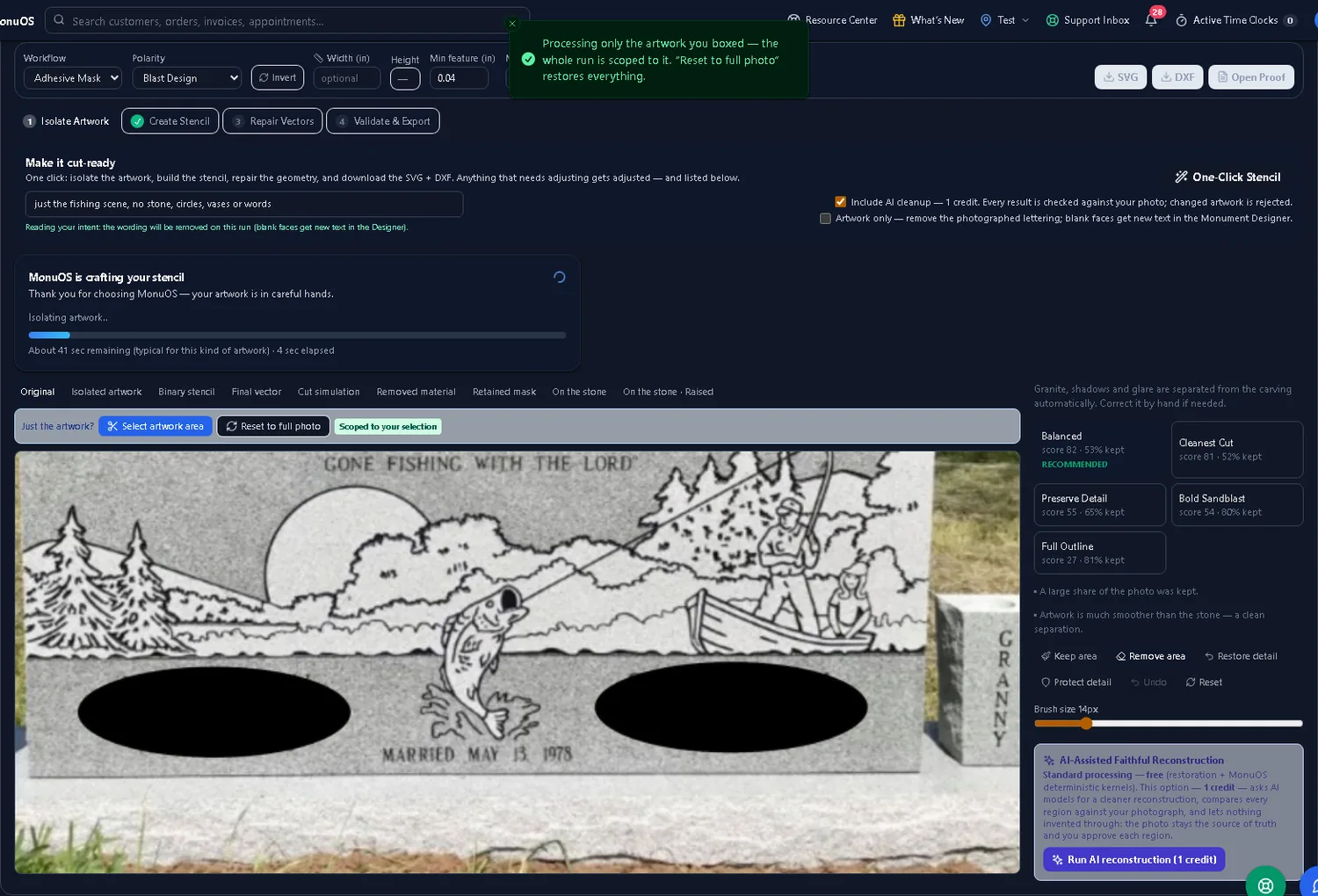
You pick from real candidates
Each run produces several isolations — a faithful extraction, a faithful cleaned redraw, and (clearly labeled) any more creative reading — scored on how much detail they keep. The most faithful clean result is recommended; a reinterpretation is never recommended over it.
Fidelity to your photo
Candidates are measured against your actual photograph, so the result reproduces the design's real edges instead of inventing new ones. What you approve is what came off the stone.
Remove & restore brushes
Brush over anything that shouldn't cut — a leftover oval, a stone edge — or restore a detail you took off, then Rebuild. The rebuild re-runs every repair and export gate on your edited geometry and keeps your changes.
Optional AI line-cleanup
Want smoother, more uniform strokes? Ask the AI artists to redraw your isolated artwork into clean cut-ready lines — checked against your photograph, compare before/after, keep or revert. One credit, always optional.
SVG and DXF that are proven before you download.
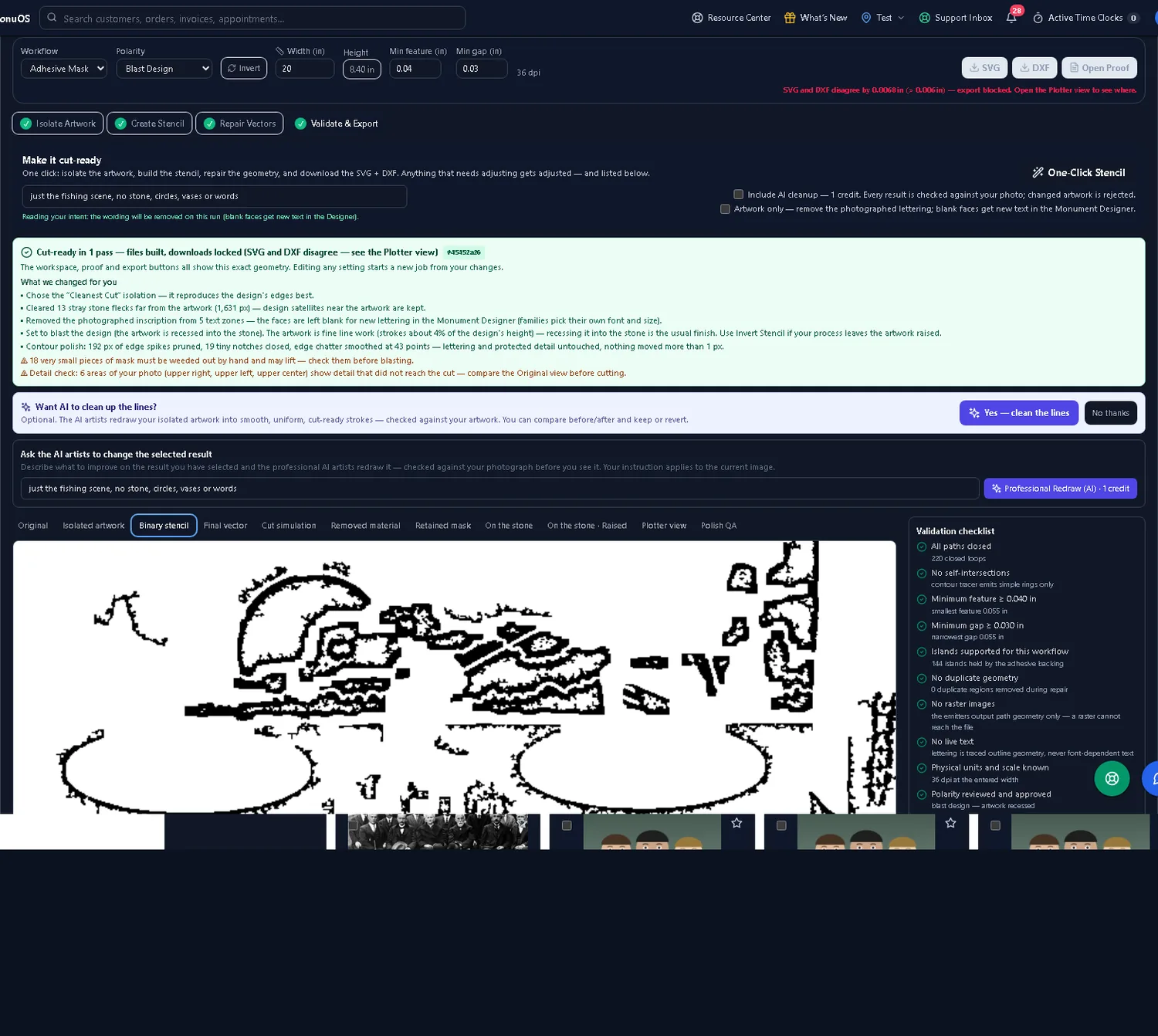
A stencil that looks fine on screen can still be un-cuttable. MonuOS checks the geometry, not just the picture — and the two files have to match before either one leaves the platform.
Closed paths only, true inch scale
The emitters output path geometry — a raster can never reach the file — with all loops closed and no self-intersections, at physical inches with a known scale.
Feature & gap floors
Minimum feature and minimum gap are checked against your entered values (for example 0.040 in feature, 0.030 in gap), so nothing is too thin to weed or too tight to blast.
SVG ≡ DXF, or no download
The SVG and DXF are compared to each other. If they disagree by more than the tolerance, both downloads lock and the plotter view points to the difference — a mismatched file never ships.
No live text
Lettering is traced to real outline geometry, never font-dependent text — so there's no font substitution on the plotter and nothing shifts between machines.
Islands & polarity handled
Islands are supported for the adhesive-mask workflow, and polarity is reviewed and approved — blast the design or Invert for a raised finish, with normal and inverted stencils both available.
Set the size when you're ready
The vector is scalable, so you don't have to commit to a physical size up front. Enter the width and MonuOS knows the true scale and dpi for the cut.
Last verified: July 17, 2026 — MonuOS Production File Lab, live run (free path, 0 credits). Line smoothness varies by the isolation candidate you pick; the optional AI line-cleanup is a polish, not required to isolate the scene.
On the stone, and on the plotter.
Preview the finished memorial as blasted or raised granite, and watch the plotter view animate the actual exported cut file — not a simulation. The SVG and the DXF are each rendered independently and compared, so what you see is what the blade follows.
Built for shops that cut their own stencils.
Sandblast & monument shops
Anyone running a plotter and blasting granite who wants clean cut files from a photo instead of hand-tracing or outsourcing artwork.
Memorial dealers & retailers
Shops that sell monuments and need to turn a customer's picture or a catalog design into a production-ready stencil quickly.
Engravers & production staff
The people at the machine who need files that import at the right size, cut cleanly, and don't hide a raster or open path.
Stencils are one job MonuOS does. Here are the neighbors.
Monument design software
Design the stone with live editable lettering in 11 monument fonts and export at true inches with real glyph outlines — then send it straight to a stencil.
Laser engraving & photo prep
Preparing a family photo for laser instead of blasting? Restore, colorize, and convert it to a laser-ready file — 4–7 versions per edit.
Shop management software Invoicing & payments
The stencil studio lives inside the same platform as your orders, quotes, proofs, production board, install scheduling, and billing.
Sandblast stencil FAQ
What files does MonuOS export?
Validated SVG and DXF at true inch scale with closed paths only, plus a scale-accurate PDF proof. Both files are verified equivalent to each other before either can be downloaded.
Will the stencil import at the right size?
Yes. The export carries physical units and a known scale (dpi at your entered width), so it imports at true size in industry cutter software — no rescaling at the plotter.
Do I have to set the size first?
No. The vector is scalable, so you can build the stencil now and set the physical width when you're ready to cut.
Does it keep circles round and curves smooth?
The contour tracer emits simple, closed rings and the repair pass smooths edge chatter, so round elements and curves stay clean rather than faceted. Pick a smoother isolation candidate or add the optional AI line-cleanup for uniform strokes.
Can I get normal and inverted stencils?
Yes. Choose Blast Design or Invert for a raised finish — normal and inverted stencils are both produced so either sandblast workflow is covered.
Does it change my artwork?
Isolation is fidelity-first: candidates are scored against your photograph and you approve the result. Any AI line-cleanup is optional, checked against your artwork, and reversible.
What does it cost to run?
Isolating and exporting a stencil runs on the free path — 0 credits. The optional AI line-cleanup uses one credit, and every plan includes 50 AI credits a month (more are purchasable). See pricing.
What if a file isn't safe to cut?
It won't ship. A stencil that fails validation or whose SVG and DXF disagree stays locked, with the plotter view pointing to the problem — a bad file never reaches the machine.
Turn your next photo into a cut file.
Start a free trial and run a real photo through the stencil studio — isolate the artwork, validate the geometry, and export SVG + DXF the same day.
Get started See all features