Turn Family Photographs Into Laser-Ready Monument Artwork
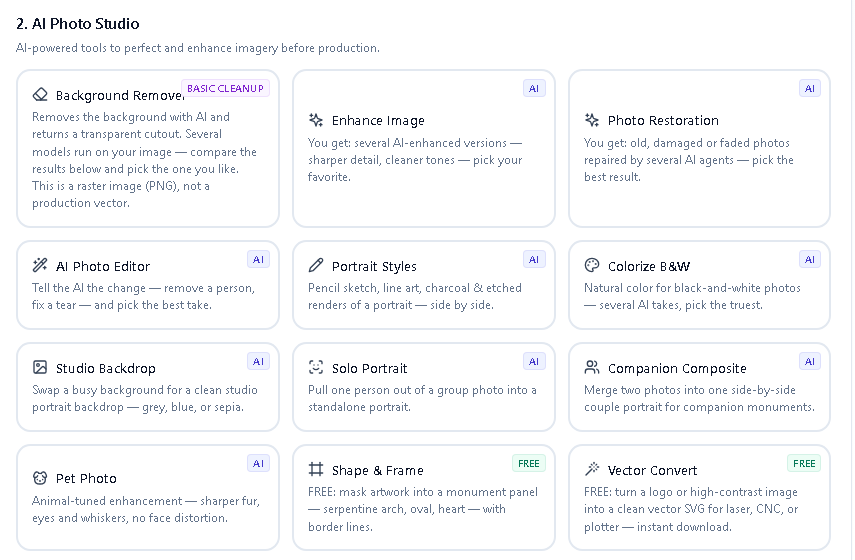
Prepping a family's photo for the laser is the job every shop dreads. MonuOS does it in-house: the AI Photo Studio removes the background, restores and enhances faded pictures, and converts a photograph into a laser-ready engraving file tuned for granite — with a live before/after preview and 4–7 versions to choose from on every edit. AI drafts; you approve. Nothing is saved, cut, or sent until you say so.
Photo to the stone, in three steps.
A family's snapshot goes in; a clean, laser-ready engraving file comes out — with you approving each step.
Drop in the family's picture
Bring in a phone snapshot or a scanned print. The AI Photo Studio takes it from there — background removal, restoration, and engraving prep all live in one place.
Pick from 4–7 versions
Every AI edit runs several models at once and hands back 4–7 versions to compare. Restore and enhance faded detail, colorize, remove the background, and convert to a laser-ready file with a live before/after preview.
Approve the final artwork
When the version is right, you approve it. Nothing is saved to the order, cut on a machine, or sent to a customer until you do — the production path stays authoritative.
A studio that preps the photo for you.
The AI Photo Studio and Production File Lab handle the whole job of turning a family's photograph into engraving-ready artwork — no Photoshop, no outsourcing.
AI background removal
Multiple AI models lift a portrait off its background, with an erase/refine brush for stray edges and a clean cutout saved straight onto the order.
Restore, enhance & colorize
Sharpen soft scans, recover faded detail, colorize, and rescue low-resolution family photos so the finished engraving does them justice.
Photo → laser-ready
Convert a photograph into a print-ready engraving file with grayscale, levels, gamma, dithering, and threshold controls tuned for granite, plus a live before/after preview.
Isolate one from a group
Pull one person out of a group photo into a standalone studio portrait — using their real pixels, never an invented face.
Companion portraits & styles
Build companion portraits and apply portrait styles to match, so two people can share a clean, consistent memorial portrait.
Epitaph & verse writer
Draft memorial verses, epitaphs, and dedication lines with an AI writer built for the trade — length and tone controls, always yours to edit.
Built to be reliable and honest.
Several AI models run on every edit, the roster heals itself, and you stay the final approver — so the shop's name is never on a result you didn't choose.
4–7 versions, every edit
Every AI edit runs several models at once and returns 4–7 versions in one go — compare them side by side and keep the best, instead of gambling on a single result.
Self-healing model roster
Because several models run together, a single provider outage never reaches the shop — the studio routes around it and still hands back results.
Etched-stone preview
Show families a simulation of the finished stone while the production paths stay authoritative — what they approve is what the machine cuts.
Real pixels, no invented faces
When one person is isolated from a group, the studio uses their real pixels — it never fabricates a face the family didn't provide.
AI drafts, you approve
Every result is a draft. Nothing is saved to the order, cut on a machine, or sent to a customer until you approve it.
50 AI credits included
The plan includes 50 AI credits every month, and additional credits are available to purchase when a busy month needs more.
Every AI edit runs several models at once and returns 4–7 versions; nothing is saved, cut, or sent until the shop approves it. Last verified: July 17, 2026.
Real screens from the actual platform.
Not a mockup — this is the Production File Lab where a photo becomes laser-ready.
Who it's for
If you put a portrait on granite, the studio is built for the part shops dread.
Laser engraving shops
Shops running a laser want a clean, machine-ready file from a family's photo without hand-editing every image in a separate program.
Photo & portrait memorials
Anyone offering photo memorials needs to restore faded pictures, isolate one person from a group, and preview the result before committing it to stone.
Monument & memorial dealers
Dealers who don't cut in-house can still prepare the artwork, show families an etched-stone preview, and approve exactly what goes out.
One platform, photo to finished stone.
Laser photo prep is one route. The same platform handles the sandblast route, the design, and the shop.
Sandblast route
Prefer to blast? Turn the artwork into cut-ready stencils with validated SVG and DXF — see the sandblast stencil software.
Monument design
Design, letter, price, and proof the whole stone online — see the monument design software.
Shop management
Run the orders, proofs, and payments that surround every engraving job — see the monument shop management software.
Frequently asked questions
What does the AI Photo Studio do for laser engraving?
It prepares a family's photograph for laser engraving on granite: AI background removal, restore/enhance/colorize, and conversion into a laser-ready engraving file using grayscale, levels, gamma, dithering, and threshold controls with a live before/after preview.
Does the AI invent or alter faces?
No. When one person is isolated from a group photo, the studio uses their real pixels to build a standalone portrait — it never invents a face. Every result is a draft you review and approve.
Why does each edit return several versions?
Every AI edit runs several AI models at once and hands back 4–7 versions so you can compare and keep the best. It also means a single provider outage never stops the studio from returning results.
What happens before anything is engraved?
Nothing is saved to the order, cut on a machine, or sent to a customer until you approve it. The etched-stone preview is a simulation while the production paths stay authoritative.
How many AI credits are included?
The plan includes 50 AI credits every month, and you can purchase additional credits when you need them. See the pricing page for full details.
Can I restore an old or faded photo?
Yes. The studio can restore, enhance, and colorize faded or low-resolution photos so the finished engraving does the picture justice.
Turn a phone photo into a laser-ready portrait.
Remove the background, restore the detail, pick from several versions, and approve the final artwork — all inside one platform built for the memorial industry.
Start free trial See all features